Showing posts with label java. Show all posts

How to check the size of JLabel before show it on the screen in JDialog

 When configuring a JDialog, there are times when you need to check the size of a JLabel.

Even if you set the text after creating a JLabel, its size is not set.


In this case, if you set the dialog panel and then call pack(), the size of the JLabel will be set and you can read the value.

Then, you can create the necessary UI using the read size value and set the panel again.


When a JLabel is placed next to another component, it is used to fit the window size.


Create Swing CustomLineBorder (apply by specifying top, left, bottom, right)

Overriding border to apply border only to the specified side

package test.swing;

import javax.swing.*;
import javax.swing.border.AbstractBorder;
import java.awt.*;

// Custom Line border
public class MainTest {
    public static void main(String[] args) {
        MainUI mainUI = new MainUI();
        mainUI.setVisible(true);
    }
}

class CustomLineBorder extends AbstractBorder
{
    public static final int TOP = 0x1;
    public static final int LEFT = 0x2;
    public static final int BOTTOM = 0x4;
    public static final int RIGHT = 0x8;
    private Color mColor;
    private int mThickness;
    private int mTarget;

    public CustomLineBorder(Color colour, int thickness, int target)
    {
        mColor = colour;
        mThickness = thickness;
        mTarget = target;
    }

    @Override
    public void paintBorder(Component c, Graphics g, int x, int y, int width, int height)
    {
        if (g != null)
        {
            g.setColor(mColor);
            if ((mTarget & TOP) != 0) {
                for (int i = 0; i < mThickness; i++) {
                    g.drawLine(x, y + i, width, y + i);
                }
            }
            if ((mTarget & LEFT) != 0) {
                for (int i = 0; i < mThickness; i++) {
                    g.drawLine(x + i, y, x + i, height);
                }
            }
            if ((mTarget & BOTTOM) != 0) {
                for (int i = 0; i < mThickness; i++) {
                    g.drawLine(x, height - i - 1, width, height - i - 1);
                }
            }
            if ((mTarget & RIGHT) != 0) {
                for (int i = 0; i < mThickness; i++) {
                    g.drawLine(width - i - 1, y, width - i - 1, height);
                }
            }
        }
    }

    @Override
    public Insets getBorderInsets(Component c)
    {
        return (getBorderInsets(c, new Insets(0, 0, 0, 0)));
    }

    @Override
    public Insets getBorderInsets(Component c, Insets insets)
    {
        insets.top = 0;
        insets.left = 0;
        insets.bottom = 0;
        insets.right = 0;
        if ((mTarget & TOP) != 0) {
            insets.top = mThickness;
        }
        if ((mTarget & LEFT) != 0) {
            insets.left = mThickness;
        }
        if ((mTarget & BOTTOM) != 0) {
            insets.bottom = mThickness;
        }
        if ((mTarget & RIGHT) != 0) {
            insets.right = mThickness;
        }

        return insets;
    }

    @Override
    public boolean isBorderOpaque()
    {
        return true;
    }
}

class MainUI extends JFrame {
    MainUI() {
        setPreferredSize(new Dimension(400, 420));
        
        JPanel pane = new JPanel(new FlowLayout(FlowLayout.CENTER, 0, 20));
        pane.setBackground(new Color(0x85, 0x85, 0x85));

        JLabel label = new JLabel("Red, 1, TOP");
        label.setPreferredSize(new Dimension(300, 40));
        label.setOpaque(true);
        label.setBackground(Color.WHITE);
        label.setBorder(new CustomLineBorder(Color.RED, 1, CustomLineBorder.TOP));
        pane.add(label);

        label = new JLabel("Red, 5, LEFT");
        label.setPreferredSize(new Dimension(300, 40));
        label.setOpaque(true);
        label.setBackground(Color.WHITE);
        label.setBorder(new CustomLineBorder(Color.RED, 5, CustomLineBorder.LEFT));
        pane.add(label);

        label = new JLabel("Red, 5, Bottom");
        label.setPreferredSize(new Dimension(300, 40));
        label.setOpaque(true);
        label.setBackground(Color.WHITE);
        label.setBorder(new CustomLineBorder(Color.RED, 5, CustomLineBorder.BOTTOM));
        pane.add(label);

        label = new JLabel("Red, 15, Right");
        label.setPreferredSize(new Dimension(300, 40));
        label.setOpaque(true);
        label.setBackground(Color.WHITE);
        label.setBorder(new CustomLineBorder(Color.RED, 15, CustomLineBorder.RIGHT));
        pane.add(label);

        label = new JLabel("Blue, 5, TOP LEFT");
        label.setPreferredSize(new Dimension(300, 40));
        label.setOpaque(true);
        label.setBackground(Color.WHITE);
        label.setBorder(new CustomLineBorder(Color.BLUE, 5, CustomLineBorder.LEFT | CustomLineBorder.TOP));
        pane.add(label);

        label = new JLabel("Blue, 5, TOP RIGHT BOTTOM");
        label.setPreferredSize(new Dimension(300, 40));
        label.setOpaque(true);
        label.setBackground(Color.WHITE);
        label.setBorder(new CustomLineBorder(Color.BLUE, 5, CustomLineBorder.TOP | CustomLineBorder.RIGHT | CustomLineBorder.BOTTOM));
        pane.add(label);

        add(pane);

        pack();
    }
}

Run


Resize panel when component moves to the next line in FlowLayout

 Code to adjust the height of the JPanel to the last component when the Resize event occurs


package test.swing;

import javax.swing.*;
import java.awt.*;
import java.awt.event.*;

// resize panel
public class MainTest {
    public static void main(String[] args) {
        MainUI mainUI = new MainUI();
        mainUI.setVisible(true);
    }
}

class MainUI extends JFrame {
    FlowLayout flowLayout = new FlowLayout(FlowLayout.LEFT, 0, 0);
    JPanel resizePane = new JPanel(flowLayout);
    JButton testBtn1 = new JButton("TEST 1");
    JButton testBtn2 = new JButton("TEST 2");
    JButton testBtn3 = new JButton("TEST 3");
    JButton testBtn4 = new JButton("TEST 4");
    JButton testBtn5 = new JButton("TEST 5");
    JComponent lastComponent = testBtn5;

    MainUI() {
        setPreferredSize(new Dimension(500, 300));
        setLayout(new BorderLayout());

        resizePane.setBackground(Color.BLUE);
        resizePane.addComponentListener(new ComponentAdapter() {
            Point prevPoint = null;

            @Override
            public void componentResized(ComponentEvent e) {
                super.componentResized(e);
                if (prevPoint == null || prevPoint.y != lastComponent.getLocation().y) {
                    System.out.println("lastComonent moved to " + lastComponent.getLocation());
                    resizePane.setPreferredSize(new Dimension(resizePane.getPreferredSize().width, lastComponent.getLocation().y + lastComponent.getHeight()));
                    resizePane.updateUI();
                }
                prevPoint = lastComponent.getLocation();
            }
        });

        resizePane.add(testBtn1);
        resizePane.add(testBtn2);
        resizePane.add(testBtn3);
        resizePane.add(testBtn4);
        resizePane.add(testBtn5);
        add(resizePane, BorderLayout.NORTH);

        JPanel pane = new JPanel();
        pane.add(new JLabel("TEST TEST"));
        add(pane, BorderLayout.CENTER);

        pack();
    }
}
RUN


Show tooltip when JComboBox key is pressed

 Code that shows tooltip when key occurs by key listener in JComboBox


package test.swing;

import javax.swing.*;
import java.awt.*;
import java.awt.event.KeyAdapter;
import java.awt.event.KeyEvent;
import java.awt.event.MouseEvent;

// key event tooltip
public class MainTest {
    public static void main(String[] args) {
        MainUI mainUI = new MainUI();
        mainUI.setVisible(true);
    }
}

class TestComboBox extends JComboBox {
    JTextField mTf = null;
    public TestComboBox() {
        super();
        mTf = (JTextField) editor.getEditorComponent();
        mTf.setToolTipText("TextField : ");
        mTf.addKeyListener(new KeyHandler());
    }

    class KeyHandler extends KeyAdapter {
        @Override
        public void keyReleased(KeyEvent e) {
            // set tooltip
            mTf.setToolTipText("TextField : " + mTf.getText());
            // show tooltip
            ToolTipManager.sharedInstance().mouseMoved(new MouseEvent(mTf, 0, 0, 0,0, 0, 0, false));
            super.keyReleased(e);
        }
    }
}

class MainUI extends JFrame {
    MainUI() {
        setPreferredSize(new Dimension(400, 300));
        setLayout(new FlowLayout());
        TestComboBox combo = new TestComboBox();
        combo.setToolTipText("ComboBox");
        combo.setEditable(true);
        add(combo);
        pack();
    }
}

java swing dynamic tooltip, multi-line tooltip

Implemented with getToolTipText method override


https://docs.oracle.com/javase/8/docs/api/javax/swing/JComponent.html#getToolTipText-java.awt.event.MouseEvent-

package test.swing;

import javax.swing.*;
import java.awt.*;
import java.awt.event.MouseEvent;

// dynamic tooltip
public class MainTest {
    public static void main(String[] args) {
        MainUI mainUI = new MainUI();
        mainUI.setVisible(true);
    }
}

class ToolTipButton extends JButton {
    boolean mIsNum = true;

    public ToolTipButton(String text) {
        super(text);
    }

    // 1. use setToolTipText
    @Override
    public String getToolTipText(MouseEvent event) {
        if (mIsNum) {
            setToolTipText("0123456789");
        }
        else {
            setToolTipText("ABCDEFG");
        }
        mIsNum = !mIsNum;
        return super.getToolTipText(event);
    }

    // 2. return text directly
    @Override
    public String getToolTipText(MouseEvent event) {
        String text = "";
        if (mIsNum) {
            text = "0123456789";
        }
        else {
            text = "ABCDEFG";
        }
        mIsNum = !mIsNum;
        return text;
    }
}

class MainUI extends JFrame {

    MainUI() {
        setPreferredSize(new Dimension(400, 300));
        setLayout(new FlowLayout());
        JButton button = new ToolTipButton("TEST");
        button.setToolTipText("");
        button.setPreferredSize(new Dimension(100, 100));
        add(button);
        pack();
    }
}
Multi-line tooltip
setToolTipText("<html>a<br>b</html>");

Remove gap in FlowLayout in swing

https://docs.oracle.com/en/java/javase/17/docs/api/java.desktop/java/awt/FlowLayout.html

// When creating layout
public FlowLayout(int align, int hgap, int vgap)
new FlowLayout(FlowLayout.LEADING, 0, 0);

// remove horizontal gap
public void setHgap(int hgap)
layout.setHgap(0);

// remove vertical gap
public void setVgap(int vgap)
layout.setVgap(0);

Registering a Java Swing KeyStroke

Close window when ESC is pressed


package test.swing;

import javax.swing.*;
import java.awt.*;
import java.awt.event.ActionEvent;
import java.awt.event.KeyEvent;
import java.awt.event.WindowEvent;

public class MainTest {
    public static void main(String[] args) {
        MainUI mainUI = new MainUI();
        mainUI.setVisible(true);
    }
}

class MainUI extends JFrame {
    MainUI() {
        setPreferredSize(new Dimension(400, 300));
        setLayout(new FlowLayout());
        JButton button = new JButton("TEST");
        button.setPreferredSize(new Dimension(100, 100));
        add(button);
        pack();

        KeyStroke escStroke = KeyStroke.getKeyStroke(KeyEvent.VK_ESCAPE, 0);
        String actionMapKey = getClass().getName() + ":WINDOW_CLOSING";
        Action closingAction = new AbstractAction() {
            public void actionPerformed(ActionEvent event) {
                MainUI.this.dispatchEvent(new WindowEvent(MainUI.this, WindowEvent.WINDOW_CLOSING));
            }
        };

        installKeyStroke(this, escStroke, actionMapKey, closingAction);
    }

    public void installKeyStroke(final RootPaneContainer container, final KeyStroke stroke, final String actionMapKey, final Action action) {
        JRootPane rootPane = container.getRootPane();
        rootPane.getInputMap(JComponent.WHEN_IN_FOCUSED_WINDOW).put(stroke, actionMapKey);
        rootPane.getActionMap().put(actionMapKey, action);
    }
}

Generate a key with the class name to be registered (to prevent duplication)

String actionMapKey = getClass().getName() + ":WINDOW_CLOSING";


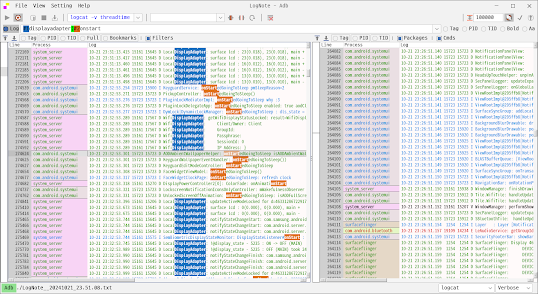
Lognote - Log viewer, Android logcat viewer for Windows, Linux, Mac

android logcat viewer for Windows, Linux, Mac   https://github.com/cdcsgit/lognote Filtered log viewer Android logcat viewer, kotlin ...