Lognote - Show only specific package logs (~ 0.3.8)

If you want to show logs only for a specific package, you can use uid.
Since uids associated with package names do not overlap unless you use sharedId, you can distinguish package logs by uid.

1. Install the app
   The uid value is set when the app is installed, so install the app first.

2. Get uid value
   After installing the package, check the uid value with the following command.
   Windows - adb.exe shell cmd package dump PACKAGE_NAME
             Check the userId or packageUid value in the output.
             ex) adb.exe shell cmd package dump com.example.myapplication > package.txt
                    
Linux, mac - adb shell cmd package dump PACKAGE_NAME | grep packageUid 3. Apply the uid value confirmed to Lognote Temporary apply(test): Add "--uid=XXX" to the logcat command above in lognote. (Removed when Lognote is restarted)
     
Add settings: Add "--uid=XXX" to the logcat command. (keep when Lognote is restarted) Setting > Log cmd You can check the newly added command in the log command combo box.
     

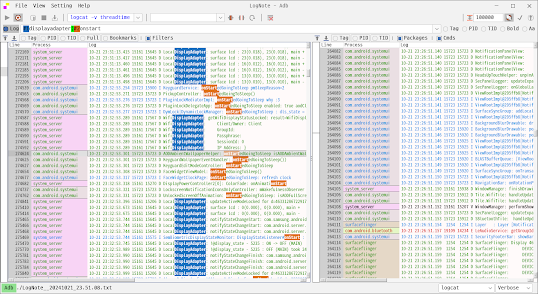
4. Result - Only logs based on uid values

* The uid is maintained, so you only need to check the uid when installing it for the first time.

Values used by crontab

cron is a command provided in Linux to periodically schedule specific tasks.

Set up tasks through contab.

editor settings
When executing crontab -e, the select-editor command is called and the editor is set.

When you want to change the editor, run select-editor or change the value of SELECTED_EDITOR in ~/.selected_editor.

If the desired editor is not found when executing the select-editor command, change the SELECTED_EDITOR value.

When you run the crontab -e command, you can use the value in the following format.

m h dom mon dow command

field          allowed values
-----          --------------
minute         0–59
hour           0–23
day of month   1–31
month          1–12 (or names, see below)
day of week    0–7 (0 or 7 is Sun, or use names)

(Manual page crontab(5))


Example

The following lists an example of a user crontab file.    
    
# use /bin/bash to run commands, instead of the default /bin/sh    
SHELL=/bin/bash    
# mail any output to `paul', no matter whose crontab this is    
MAILTO=paul    
#    
# run five minutes after midnight, every day    
5 0 * * *       $HOME/bin/daily.job >> $HOME/tmp/out 2>&1    
# run at 2:15pm on the first of every month — output mailed to paul    
15 14 1 * *     $HOME/bin/monthly    
# run at 10 pm on weekdays, annoy Joe    
0 22 * * 1-5    mail -s "It's 10pm" joe%Joe,%%Where are your kids?%    
23 0-23/2 * * * echo "run 23 minutes after midn, 2am, 4am ..., everyday"    
5 4 * * sun     echo "run at 5 after 4 every Sunday"    
0 */4 1 * mon   echo "run every 4th hour on the 1st and on every Monday"    
0 0 */2 * sun   echo "run at midn on every Sunday that's an uneven date"    
# Run on every second Saturday of the month    
0 4 8-14 * *    test $(date +\%u) -eq 6 && echo "2nd Saturday"    
    
All the above examples run non-interactive programs.  If you wish to run a program that interacts with  the    
user's desktop you have to make sure the proper environment variable DISPLAY is set.    
    
# Execute a program and run a notification every day at 10:00 am    
0 10 * * *  $HOME/bin/program | DISPLAY=:0 notify-send "Program run" "$(cat)"

(Manual page crontab(5))


Reserved words can also be used

string         meaning
------         -------
@reboot        Run once, at startup.
@yearly        Run once a year, "0 0 1 1 *".
@annually      (same as @yearly)
@monthly       Run once a month, "0 0 1 * *".
@weekly        Run once a week, "0 0 * * 0".
@daily         Run once a day, "0 0 * * *".
@midnight      (same as @daily)
@hourly        Run once an hour, "0 * * * *".

(Manual page crontab(5))


c++ const functions and mutable

 A const function prevents its value from being changed, but the value can be changed by using the mutable keyword.

Why is mutable necessary for a function that intentionally prevents its value from changing?


A const for a variable passed as a function parameter prevents the value itself from being changed, enabling safe use.

To ensure that a function does not change the value of a member variable, the const keyword is applied to the function declaration.

The const function raises several exceptions.


1. Cannot call functions other than the same const function.


2. Member variable values cannot be changed. (Global variables can be changed)

    In most cases, this is the desired situation.


If const is set on a class member function under development, it can be modified accordingly when there is an issue.

If setting it as const is difficult, you can solve it by deleting it.


The problem arises when you use an unmodifiable library and you need to override a const function.


If class Aa is a library class, Ba must define a const function.

If you need to change member variable values in Ba class, you cannot delete const or call a function without const.

At this time, if mutable is designated for the member number, the value of the member variable can be changed.


In general, const is used when you do not want to change the value of a member variable, so using mutable is awkward.

What if the printTest function runs in a multi-threaded environment and needs to be synchronized with a mutex?

void std::mutex::lock(); The function is not a const function, so you cannot use it in printTest.


"mutable std::mutex mMutex;" Similarly, if mutable is used, locking is possible even in const functions.

mutable is seen as a necessary feature for situations like this where it is logically necessary but can't use by const.

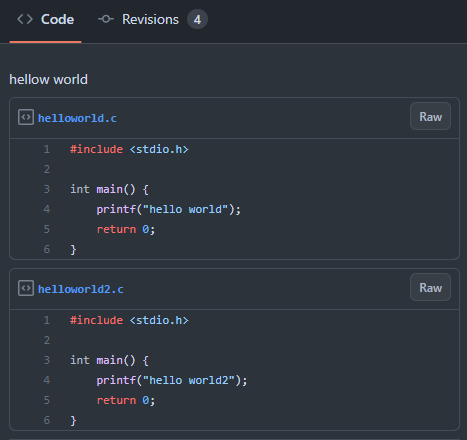
gist - to organize example code

The most necessary and used thing while writing a programming blog is to organize the code.

I applied a plugin that handles code highlighting for each blog, but it is not as easy to manage as I thought.

Explains how to organize example code using gist.

1. Go to gist ( https://gist.github.com/ )

2. After logging in, a screen for creating a new code appears.


3. Write the content.

- Gist description: A brief description of the code. You don't have to enter it, but think about it when you look at it again later.

- Filename including extension: Code highlighting according to the extension.

- Enter code

- Create secret gist: It is not searchable, but anyone can see it. (If you declare it as public, you can search it)


4. Import to your blog

- Copy the script code from Embed.


- Go to the blog html view.

- After pasting the copied code, check it in the blog preview.

- A code added through Add file moves together through Embed code.

  => If you want to do it individually, you need to create a new one through "+" at the top right, not Add file.


It is managed by revision, so it is possible to check previous revisions.

I won't use it often, but I think I'll see the previous contents at least once.


View the code applied to the blog


Kotlin syntax different from Java

While using kotlin, it summarizes differences from java and sample codes.

0. The main function does not have to be inside a class.

If the main function is defined without a class, a class is created with the file name and the main function is put into it.

1. All primitive types are classes.

Basic types are not very different from Java, but they are all in the form of classes.

2. At compile time, a check is made for the scope of the base type.

An error occurs when initializing a value beyond the maximum value, such as val a: Byte = 500.

You can prevent overflow for an initial wrong type.

3. Add fun to function definitions, val and var to variable definitions.

fun foo(a: Int): Int   // fun function_name(parameter): return_type

Add val or var in front of a variable, where val means that does not change to value, and var means that changes to variable.

4. Using a for loop

Can be used in multiple styles.

5. if, when

You can use an if statement as a value, like val c = if (a == 5) "a is 5" else "a is not 5". In this case, there should always be an else.

You can think of using when instead of switch. Use else instead of default.

The values used in when are used from basic types to class objects,

Multiple values can be grouped into one item using ','.

6. Defining member variables

If the class name parameter is defined as val or var, it becomes a member variable. It is mainly used in "data class" types.

Member variables can be initialized with the passed parameters, and can also be initialized using the init block.

In the case of var variables, you can use lateinit to delay initialization (initialize them before use).

lateinit cannot be used on val variables. val is immutable and must be initialized at creation time.

7. Defining getters and setters

In Java, you need to define get~, set~ methods, but in kotlin, you can attach get(), set(value) under member variables.

Getters and setters are simply defined, and set and get are automatically called when values are assigned or used as if using variables.

8. Using Inheritance

A class in Kotlin is a final class in Java. not inherited

Kotlin's open class is Java's class. inheritance is possible

Functions that can be overridden are prefixed with "open". When override it, add "override" in front.

Abstract classes are defined using the "abstract" keyword.

9. Null Stability - 1

When defining a variable, add "?" to determine whether to use null.

var testName: String? = null

If you attach "!!" when using it, a null pointer exception occurs when it is a null value, as when using it in java.

If you use it with "?", it doesn't do anything if it is a null value.

dog.printName()   // compile error
cat2.printName()

Both of them did a null check in the if statement, but one generated a compilation error and the other did not.

The difference is whether the value of the variable can be changed after the if statement.

If dog is a member variable and operates in multi-thread, it may change in another thread immediately after passing the if statement.

cat2 is a local variable that cannot be changed within the function. After checking for null, "." It is possible to use only

10. Null Stability - 2

dog?.let defines a block that operates only when dog is not null and accesses dog using "it".

The elvis operator "?:" simplifies the if statement.

11. data class

It is defined by attaching data in front of the class name. If the defined value is the same in the constructor parameter, true is returned during == operation.

Use "===" to check whether objects are the same.

The data class internally defines several methods such as copy and equals. (Recommended to convert and compare with java code)

12. Using Arrays

Returns an array whose values are set through arrayOf.

The value of the array can be changed (you can see what it means by comparing it to List).

There is also a way to define the number other than value setting, and it is possible to set an initial value like "IntArray(10) { index -&gt index }".

In the case of arrays related to numbers like Int type, frequently used operation functions such as sum and average are added.

13. List, MutableList

The main data storage types include a List with order, a Set without duplicate values, and a Map connected with a key.

These types cannot be changed in value, and if you want to change it, define it as a type with Mutable attached. (MutableList...)

14. Lambda expression

These days, when you look at development languages, you often see support for lambda expressions (c++, java, etc.).

It is a useful development method if you know and use it.

This expression is used when you want to access the created object's variable from another object and create the desired result.????

As I said, it is not easy to explain, but I recommend that you understand it by looking at several sample codes.

In the example code, { num -> list.contains(num) } is created as an internal object and its reference is passed to LambdaTest.

It's important to understand where lambda expressions act as inner objects.


15. Coroutines are not multi-threaded.

When I first saw it, I understood it as a multi-threaded concept because it said light concurrent work.

The operation is completely different because it is a concurrent operation that is performed without context switching.

When calling delay, which is used for coroutines, the control passes to scope management.

I think each coroutine will be called according to the delay time, but unlike multi-threading, the guarantee that it will be called is weak.

If the coroutine execution is short and a delay is called to move to scope management, you may get the desired result.

If coroutine execution is long, coroutines within the same scope are not guaranteed to be executed in time.

If you put sleep, other coroutines do not work until sleep ends.

It is used when asynchronous execution with short execution time is required.

Change to a lower version of the ubuntu kernel

When changing the kernel version in ubuntu, proceed in the following order.

Install the kernel to change

sudo apt install linux-image-5.15.0-70-generic

change grub order

Change GRUB_DEFAULT="1>4" in /etc/default/grub file
The meaning of "1>4" is to select 4 (5th item) after moving 1 (advanced, second) in the grub menu.
The value can change depending on the kernel installed situation. (/boot/grub/grub.cfg)

Apply grub changes

sudo update-grub

If the driver does not operate normally after booting, install the following two packages additionally

If already installed, reinstall with reinstall instead of install

sudo apt install linux-headers-5.15.0-70-generic
sudo apt install linux-modules-extra-5.15.0-70-generic

Checking when lock and unlock are called in std::lock_guard and std::unique_lock

std::lock_guard calls lock at creation time and unlock at destruction time (end of block).


std::unique_lock calls lock at creation time and unlock at destruction time (end of block).

In addition, lock and unlock can be called (maintaining the state value for lock).


#include <iostream>
#include <string>
#include <mutex>
 
class TestMutex {
    public:
        void lock() {
            std::cout << "call lock" << std::endl;
        }
        void unlock() {
            std::cout << "call unlock" << std::endl;
        }
};
 
TestMutex mutex1;
 
int main() {
    std::cout << "###### lock_guard start" << std::endl;
    {
        std::lock_guard lockGuard(mutex1);
        std::cout << "lock_guard created" << std::endl;
    }
    std::cout << "###### lock_guard end" << std::endl << std::endl;
 
    std::cout << "###### unique_lock start" << std::endl;
    {
        std::unique_lock uniqueLock(mutex1);
        std::cout << "unique_lock created" << std::endl;
    }
    std::cout << "###### unique_lock end" << std::endl << std::endl;
 
    std::cout << "###### unique_lock start 2" << std::endl;
    {
        std::unique_lock uniqueLock(mutex1);
        std::cout << "unique_lock created" << std::endl;
        std::cout << "manual call unlock ++" << std::endl;
        uniqueLock.unlock();
        std::cout << "manual call unlock --" << std::endl;
    }
    std::cout << "###### unique_lock end 2" << std::endl << std::endl;
 
    std::cout << "###### unique_lock start 3" << std::endl;
    {
        std::unique_lock uniqueLock(mutex1);
        std::cout << "unique_lock created" << std::endl;
        std::cout << "manual call unlock ++" << std::endl;
        uniqueLock.unlock();
        std::cout << "manual call unlock --" << std::endl;
        std::cout << "manual call lock ++" << std::endl;
        uniqueLock.lock();
        std::cout << "manual call lock --" << std::endl;
    }
    std::cout << "###### unique_lock end 3" << std::endl << std::endl;
 
 
    return 0;
}

Execution result


$ ./a.out
###### lock_guard start
call lock
lock_guard created
call unlock
###### lock_guard end

###### unique_lock start
call lock
unique_lock created
call unlock
###### unique_lock end

###### unique_lock start 2
call lock
unique_lock created
manual call unlock ++
call unlock
manual call unlock --
###### unique_lock end 2

###### unique_lock start 3
call lock
unique_lock created
manual call unlock ++
call unlock
manual call unlock --
manual call lock ++
call lock
manual call lock --
call unlock
###### unique_lock end 3

Lognote - Log viewer, Android logcat viewer for Windows, Linux, Mac

android logcat viewer for Windows, Linux, Mac   https://github.com/cdcsgit/lognote Filtered log viewer Android logcat viewer, kotlin ...